
How to Sell Custom Neon Signs on Shopify
What to decide, how to price and what customers need to see to sell custom LED neon signs on Shopify without quoting each one by email.
Custom LED neon signs are one of the easiest signs to sell online and one of the hardest to sell well. Buyers arrive with a word in mind (“Good Vibes”, a business name, a couple’s initials) and three questions: what will it look like, how big will it be, and how much does it cost. If your store answers those questions by email, most of them leave before you reply.
This guide walks through what a neon sign shop needs to sell custom signs on Shopify without quoting each one by hand: what to decide before you build the product page, how to price, what the customer should see, and how orders should reach your workshop.
Why quote-by-email loses neon sales
Neon is an impulse purchase that needs reassurance. A customer browsing at 11 p.m. wants to type their text, try two fonts and see the price now. A contact form asks them to wait a day for a mockup and a quote, and many never come back. Shops that sell custom neon online successfully have one thing in common: the customer designs the sign, sees it glow and sees the price on the product page, then pays through the normal checkout.
The same approach also saves time on your side. Every quote you no longer write is time spent producing signs instead of answering “how much for 80 cm in pink?”.
Step 1: decide exactly what you make
An online configurator is only as good as the limits you give it. Before building anything, write down what your workshop can actually produce:
- Fonts: the typefaces you can bend or route in LED flex. A script font with thin joins and a bold block font do not use the same amount of flex, and some fonts are impossible below a certain letter height. Five to ten fonts are plenty; more slows customers down.
- Colors: the LED flex colors you stock, plus any mixed or color-changing options you sell.
- Sizes: a few standard sizes (Small, Medium, Large, or real widths), the minimum letter height you accept, and the maximum size you can ship.
- Lines and characters: how many lines a sign can have, and how many characters per line for each size.
- Backboards: cut to shape, rectangle, or none; clear or colored acrylic.
- Extras: jacket (white or colored tube when off), mounting kit, hanging chains, dimmer or remote, plug type, cable color.
Anything that is not on this list should not be selectable. That single rule removes most of the problems neon shops have with online orders.
Step 2: choose a pricing model
Neon is priced from the text. The most common models are:
- Price per letter, with different rates by size range. Simple to explain, and close enough for most block fonts.
- Price by length of LED flex, which follows the real material cost: a long script word costs more than a short block word of the same width.
- A combination of both, with a start price that covers the power supply, the backboard cut and labor.
Extras then add a fixed amount or a percentage. Set a minimum order price so a two-letter sign still covers your set-up. The neon sign price calculator guide explains each model in detail, with a worked example.
Step 3: show customers what they will receive
A good neon product page lets the customer:
- Type one or more lines of text and see it rendered in each font, with their own words rather than a sample.
- Pick a color and switch between a day view and a night view to see the glow.
- See the real width and height of the sign update as they type and change the size.
- Choose the backboard, jacket and mounting, with a small picture or explanation for each.
- See the price update with every change, before they click add to cart.
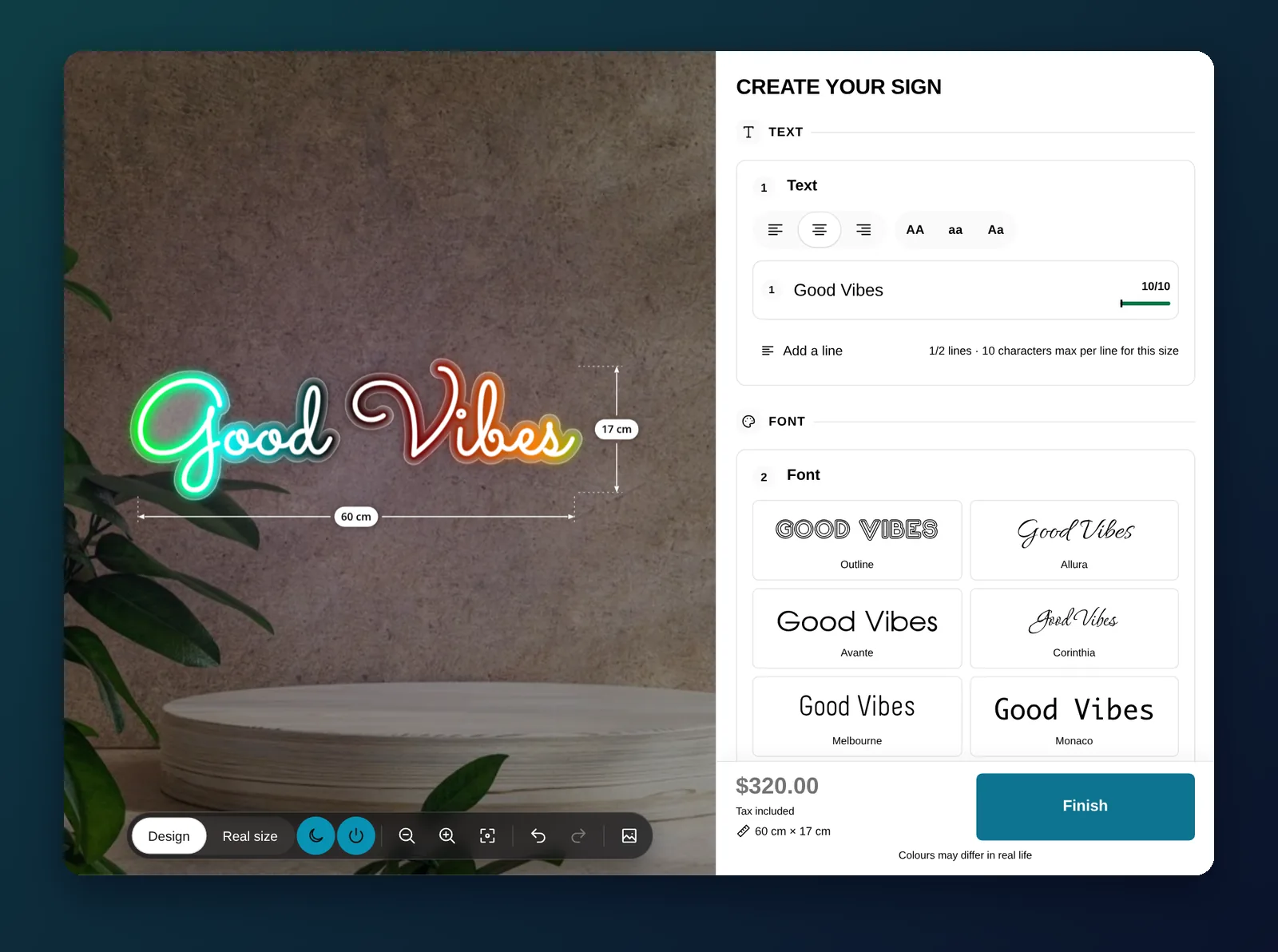
Keep the product page itself useful too: photos of real signs you made, production and delivery times, what is in the box (power adapter, mounting hardware), and your warranty. The configurator answers “what will mine look like”; the page answers “can I trust this shop”.
Step 4: make orders arrive ready to produce
An online neon order should never need a follow-up email. Make sure each order carries:
- The exact text, line by line, with the font and color of each line.
- The final width and height, the backboard type and color, the jacket and the mounting.
- A design file your workshop can use: an SVG of the lettering is the usual starting point for bending templates or CNC backboard cuts.
If a partner manufactures your signs, send them the order automatically when it is paid rather than forwarding emails by hand.
Step 5: test before you launch
- Type a very short text and a very long one in each size: is the price sensible for both?
- Try each font with lowercase and uppercase letters: do the dimensions look right?
- Check every combination you excluded is really hidden (for example a backboard color you only offer on large signs).
- Place a test order and compare the cart total, the order recap and the file with what you designed.
- Repeat on a phone: most neon buyers browse on mobile.
Common mistakes
- Too many fonts and colors. Choice paralysis is real. Offer your best sellers.
- One price for every font. Script fonts use more flex. Link each font to its own pricing or measurements.
- No minimum price. Tiny signs cost almost as much to set up as medium ones.
- Hidden lead times. Custom neon takes days to make. Say so on the product page, not after payment.
Doing it with All Sign Customizer
All Sign Customizer is the Shopify app we build for this. Its neon letter configurator covers the steps above: fonts linked to pricing profiles (per letter, by flex length, or both), colors with day and night glow, backboards, jackets and mountings with exclusions, real dimensions, and orders that carry the recap and an SVG, with an optional email to your manufacturer. The Neon Letter Sign guide builds a complete product step by step, and the live neon demo shows the result on a real store.